¶ PackageAPI SDK Overview
These pages describe the SDK for developing .NET and Python applications that create and modify packages for the Yaskawa Smart Pendant - a programming pendant for Yaskawa robots. The SDK contains the same package code as SmartPackager, so SmartPackager doesn't need to be installed.
¶ Overview
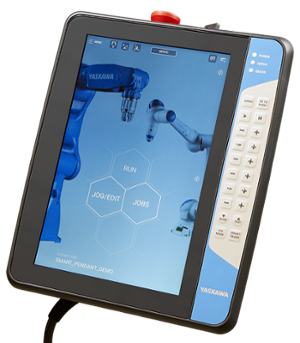
The PackageAPI SDK allows creating and modifying .yip packages for the touch screen programming pendant - the Smart Pendant (pictured above). This SDK is targeted at software developers comfortable with C# or python programming and with some experience developing software applications.
The pendant hardware consists of an ARMhf embedded computer that runs the pendant UI independently from the real-time robot control system running on the controller (e.g. YRC1000micro). This SDK allows developers to create applications that can create or modify .yip packages for the Smart Pendant. Applications can be implemented as stand-alone C# executables or python scripts that use the PackageAPI.
Requirements:
- Linux x86_64: Ubuntu 22.04 or later (or another distribution with glibc 2.34 or later)
- .NET: the .NET 8 SDK or later (the package targets net8.0)
- Python: Python 3.8 or later
- The GLib library (
libglib2.0-0). Desktop installs have it; minimal installs, such as containers, may needsudo apt install libglib2.0-0.
Developers may use the IDE with which they are most comfortable.
¶ API (Application Programming Interface)
The API is divided into two parts - C# and Python. The API contains functions for creating and modifying SmartPendant .yip packages. It can generate private and public keys, create protected and unprotected .yip packages, add components defined by json files or remove them.
¶ Execution Environment
The PackageAPI SDK is distributed as a .NET NuGet package, PackageAPI.1.0.0.nupkg, and as a Python wheel, package_api-1.0.0-cp38-abi3-linux_x86_64.whl, for use in C# applications or Python scripts. The .yip packages created or modified by those applications can be installed on the Yaskawa SmartPendant.
¶ Packaging
For distribution, the PackageAPI can be used to combine Yaskawa extension executables and supporting files into a single Yaskawa Install Package (.yip). This can be distributed to end users, who can copy it to a USB drive and insert it into the pendant for installation.
¶ Package protection and keys
A protected package is tied to your vendor private key. Without that key (or a Yaskawa key), the PackageAPI and SmartPackager won't change the package (addComponent, removeComponent, changeVendorKey) or show its contents (getJson). Anyone can see a package's summary - its name, version, display name, vendor and type - with getPackageInfo and listPackages. An unprotected package can be read and changed by anyone.
Anyone with the package file can install it on a Smart Pendant, so don't put passwords or other secrets in a package.
Changes made with addComponent, removeComponent or validate keep the package's existing key. To protect an unprotected package, move a package to another key, or remove its protection, use changeVendorKey.
Keep your private key file safe and backed up: generateVendorKey creates it readable only by you, and without it you can't change your protected packages or read their contents.
¶ Errors and warnings
Methods don't raise exceptions for expected failures. They return a failure value - False (.NET false), "", an empty dictionary or an empty list - and getLastError() gives the reason, including any detail from the package code (for example why a package is invalid). getWarnings() lists problems that didn't stop the call, such as an icon that couldn't be included. Check both after each call; they are cleared at the start of the next one.
Errors and warnings are also printed to standard error. Nothing is printed on success, and the SDK writes no files to the current directory. (A packager.ini there, if present, sets the language used for display names.)
¶ Quick Start
Developing a simple C# PackageAPI application
Developing a simple Python PackageAPI application
¶ References
Dotnet PackageAPI SDK Reference
Python PackageAPI SDK Reference
Install Package Format
Smart Packager
¶ Support
For general support with Yaskawa Motoman Robotics products, contact support for your region. (Direct US Support link)